
Showing posts with label PowerPoint to DVD. Show all posts

Sunday, February 22, 2009

PowerPoint to DVD Converter--Camtasia and Wondershare PPT2DVD

PowerPoint is among the most prevalent forms of persuasive technology used by business people, educators, students and trainers. Suppose you need to burn PowerPoint to DVD, I know it is not very popular, the most common reasons for converting PowerPoint to DVD are usability, portability and storage. Since DVD has become the preferred video format for most consumer applications and computer peripherals, creating a PowerPoint DVD makes good sense for storing and sharing. The DVD can be played on PCs which support DVD and TV with a DVD player connected.

Nowadays there are two types of tools meet the standard for converting PowerPoint to DVD. One is the screen recording tool and the other is the PowerPoint converter. The typical examples for these two types are TechSmith Camtasia and Wondershare PPT2DVD, after the testing, you may find the difference between these two tools.

TechSmith Camtasia (http://www.techsmith.com/camtasia.asp)

TechSmith Camtasia allows customers to create professional and engaging presentations, demonstrations and marketing videos in HD-quality video to reach audiences online, on portable media devices, or on popular online video sharing sites. Furthermore, Camtasia provides a PowerPoint add-in which can quickly and easily record PowerPoint presentations and produce DVD right from within PowerPoint.

Pros of using Camtasia to convert PowerPoint to DVD:

1. Staring slide show in PowerPoint, you may advance the presentation as you wish. The output will look the same as rehearse.

2. You may add narrations into your slide show while playing in PowerPoint.

3. You may edit the recorded video with Camtasia. Many great and practical features are provided.

4. You can save the video file to almost all of the common multimedia formats like SWF, MP4, AVI, WMV, MOV, RM, EXE and GIF.

5. A 30 days free try may meet your short term demand.

Cons of using Camtasia to convert PowerPoint to DVD: You need a powerful computer (higher than mainstream configuration) to run Camtasia smoothly because it consumes a lot system resources when recording PowerPoint. The recommended RAM is 2GB and the processor is 3GHz. The recording process may be freeze sometime if your PC is a dog. When burning the PowerPoint video to DVD, a third part DVD burning software is needed.

Wondershare PPT2DVD (http://www.ppt-to-dvd.com)

“If you're interested in sharing your PowerPoint presentations as DVDs to be played on a DVD player, this program gives you a simple, no-fuss way to do it. Wondershare PPT2DVD burns a completed presentation to a DVD, and includes all aspects of it, including transitions, music, videos, and so on.” From PC world, Preston Gralla.

As the first program that provides the PowerPoint to DVD solution, PPT2DVD has its own features such as:

1. The converting process is very simple and no-fuss just as Preston said, import the PowerPoint presentations into the program (you can import 12 files at a time), choose the right output format and some advanced settings if you need, then the program can convert your PowerPoint presentation to DVD without your attendance.

2. The DVD menu makes the output more easily to navigate. You can jump to the right presentation with a DVD remote control.

3. The playing mode, playing DVD automatically or manually gives you more choices when presenting your PowerPoint to your audience on TV.

4. It retains all sounds, animations, video clips and even the hyperlinks (between slides) in the output files.

5.Compared to Camtasia, an average configured is power enough for Wondershare PPT2DVD.

Compare to the first conversion method, in the converting process, you cannot figure out how will the output looks like. Just like a black box, you don’t know what happened in it. Sometimes it may lead the unpredictable failure. And, PPT2DVD can just record the elements in the PowerPoint, it is not possible for you to add your voice to your presentation, hope this function will be added in the future version.

Still, there are many other PowerPoint to DVD/video tools on the Internet like Acoolsoft PPT2DVD, E.M. Free PowerPoint Video Converter, authorSTREAM and so on. Users who are looking for the PowerPoint to DVD/video converter can have an evaluation about them.

Friday, December 12, 2008

Photo DVD- Preserve your Christmas Memories by Creating Photo DVD with PowerPoint

Finally after some busy months, it’s time for Christmas holiday. What is your plan for this holiday? Maybe you should take part in the party for companies, families and friends. Maybe you decide to carry out your traveling plan for this year. And, if you spend this holiday at home, you may have fun with your family members when having dinner or decorating the Christmas tree. Do you want to preserve these happy memories? Here is the way to preserve your happy time with PowerPoint, DVD discs and your Christmas photos.

Step 1: Making a PowerPoint photo album

One of the most fun features available in PowerPoint 2007 is creating a photo album. In the Christmas season, you may take lots of wonderful photos and a great way of organizing and share them with people is by creating photo albums. In this tutorial, I will show you the basics of creating a photo album in PowerPoint 2007.

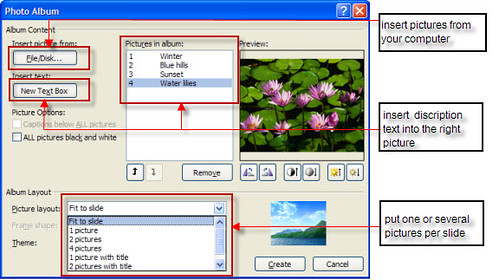
First, try to keep your pictures in a picture folder to make it easy to be found. Open your PowerPoint, go to Insert>Photo Album and select the pictures in the folder then insert them into the PowerPoint photo album.

Next, go to the bottom of the pop up window box, and select a layout for your pictures –You can choose to put one picture or several pictures per slide.

While in the Photo Album, if you want to add text to the pictures you can do that by clicking the “New Text Box” button right under “Insert Text” sign.


Click the Create button, Ok, you have just created a photo album. Then you can add music or animations to your pictures.

Step2: Making a Photo DVD, burning your PowerPoint album to DVD

After the Christmas holiday, there are always a lot of things memorable. If there are 100 pictures in your PowerPoint photo album, it may take you 200M disk space, and if you want to email it to others, it is too large to be enclosed. If you send this photo album to your mother or grandmother, they may want to view this PowerPoint album on TV rather than view it on their computer. Burning PowerPoint to DVD can solve these problems. After burning PowerPoint to DVD, you can view the PowerPoint on TV with a DVD player and you will be surprised to find that all your sound and animation in the PowerPoint photo album are retained, most importantly, you can make DVD menu for your PowerPoint photo album.

Here are 5 ways to convert PowerPoint to CD/DVD

Step3: Sending the CD/DVDs to others as Christmas gift

If you are a party organizer, surprise your party members by sending them the photo DVD. Members can also send the photo DVD to the organizer for his/her wonderful party. And if you are living far from your parents, sending the photo DVD to them and telling them that you are happy and growing. You may have many thought that why you should send the photo DVD to others.

Burning your PowerPoint photo album to DVD is just one tip for your Christmas holiday. Hope you have a merry Christmas with shopping, Christmas gifts, Santa and your friends.

Want to learn more? These are related…

PowerPoint to AVI Play PowerPoint on YouTube, Pocket PC and Blackberry

PowerPoint to WMV Play PowerPoint on YouTube, Pocket PC, Blackberry and Zune
Free Christmas PowerPoint templates


Wednesday, August 27, 2008

The world’s leading PowerPoint to DVD solution provider Wondershare released PPT2DVD 5.0.0 with Great Improvements

Aug 26, 2008-Wondershare- the world’s leading PowerPoint to DVD solution provider, today announced the release of PPT2DVD 5.0, an innovation that contributes greatly to the quality improvement of the last version. Continue to put all efforts in perfecting the product and satisfying the customers. It is so far the best choice for you to burn PowerPoint to DVD for personal or commercial purpose.

Why should we burn PowerPoint to DVD?
1. PowerPoint has become ubiquitous in many areas but can only keep the wealth of information locked inside the room. PPT2DVD helps you crack this big nut and enables you to burn your PowerPoint to DVD for wildly sharing and delivering.
2. DVD machine takes the place of a computer when showing your PowerPoint presentations. Low cost, but high efficiency.
3. By burning PowerPoint to DVD your presentations will live for more than 50 years! DVD is Ideal for long time preservation, while a hard disk will die in 10 years.
4. Prevent your PowerPoint presentations from unauthorized editing.


Key Features of Wondershare PPT2DVD 5.0
1. Remain all the animations, transitions, sounds, video clips, and internal links in the original presentation;
2. An easy step-by-step conversion guide and flexible Output Options;
3. Support generating high resolution video for HD-DVD and standard DVD;
4. Create professional look DVD menus for flexible and fast navigation;
5. Make the videos in the original PowerPoint presentation full-screen play;
6. Supports converting 12 PowerPoint files at a time;
7. Compatible with Windows Vista, XP, 2000, PowerPoint 97-2007.


Learn more about PPT2DVD

What’s New in Wondershare PPT2DVD 5.0
1. The convert speed, output quality and compatibility are improved significantly due to the new processing engine.
2. The reputed easy-to-use user interface is more user-friendly and easy-understanding.
3. The innovative sound recorder is powered to retain all kinds of sounds in your presentations.
4. Adding logo(s) to all your presentations is a thing of few seconds. It is very easy to add logo(s) for your business presentations.

System Requirements
1. Office Requirement: Microsoft PowerPoint Version 97-2007

2. Operating System: Windows (32) 2000/XP (Service Pack 2)/2003/Vista
3. RAM Requirement: 256MB RAM or above
4. Available Disk Space: 2 GB Free Space or larger
Other Requirements: Windows-compatible display with at least 800 x 600 resolutions. Windows-compatible sound card (recommended) DirectX 9 or above


About Wondershare PPT2DVD
Wondershare PPT2DVD is the flagship product among Wondershare presentation tools which are easy-to-use, with comprehensive feature set and superior output quality. PPT2DVD is ideal for trade show, digital signage, business fair, company presentation, celebration and etc.

Friday, August 22, 2008

Wondershare Back-to-School Promotion

August 25, 2008-Wondershare Software Co., Ltd, start the back-to-school promotion, this promotion will last for about 40 days, during the promotion, Wondershare provides 30% discount for PPT2DVD and 20% discount for PPT to Video. Customers who buy the product can also get a pack of 8 free PowerPoint templates during the promotion.
Learn more about Wondershare back-to-school promotion

What is Wondershare PPT2DVD?
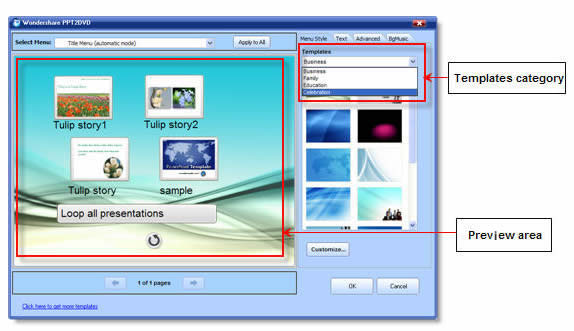
Wondershare PPT2DVD is the first program offering a cost-effective method to burn PowerPoint presentations to DVD. All animations, sounds, video clips and hyperlinks between slides will be retained after conversion. No complex computer skills are required. Just import the PowerPoint files, create professional look DVD menus from build-in templates, and start the burning process. It’s all that easy! Learn more about Wondershare PPT2DVD

The benefits of using Wondershare PPT2DVD
1.Burn your courseware and project report to DVD for easy sharing and delivery
2.You won’t need to worry about your courseware being modified after burning it to DVD
3.DVD based courseware will be played smoothly, no matter you have a PC, Mac or DVD machine

What is Wondershare PPT to Video
Wondershare PPT to Video is an all-in-one PowerPoint to video converter. It empowers you to convert PowerPoint presentations to almost all popular video formats such as AVI, MP4, WMV, ASF, MOV, MPEG and so on, with excellent quality. Learn more about PPT to Video

The benefits of using Wondershare PPT to Video
1.Share your PowerPoint courseware worldwide via blog, YouTube and iTunes
2.Review your PowerPoint courseware on iPod, iPhone, Pocket PC
3.Play PowerPoint courseware on computers without PowerPoint installed
4.Reduce PowerPoint file size by up to 90% for easily emailing your courseware to others

Pricing and Availability
The original price of Wondershare PPT2DVD is $99.95 and Wondershare PPT to Video is $49.95. Academic users can get PPT2DVD for $69.95 and PPT to Video for $39.95 during the promotion.

About Wondershare Software Co., Ltd
Established in the year 2003, Wondershare is dedicated in developing innovative multimedia applications for individuals and businesses. The flagship product like PPT2DVD is accepted by more than 300,000 users all over the world. The name of Wondershare shows a will of the founder of the company and the folks here to share their creativity with the world, and make the life and work of others easier.

Wednesday, May 21, 2008

Wondershare PPT2DVD 4.7.0 Released

New! Wondershare PPT2DVD 4.7.0 Released
May 21st, 2008-
Wondershare- the world’s leading PowerPoint to DVD conversion program, today announced the release of PPT2DVD 4.7, an innovation that contributes greatly to the quality improvement of the last version. Continue to put all effort in perfecting the product and satisfying the customers. It is so far the best choice for you to burn PowerPoint to DVD for personal or commercial purpose.


Key Features

1. All the animations, transitions, sounds, video clips, internal links contained in the original presentation would perform exactly the same after the conversion;

2. An easy step-by-step conversion guide;

3. Flexible Output Options;

4. Support generating high resolution video for HD-TV playback;

5. Create professional look DVD menus for flexible and fast navigation;

6. Makes the videos in the original PowerPoint presentation full-screen play;

7. Supports 12 PowerPoint files convert at a time;

8. Compatible with Windows Vista, PowerPoint 2007.


What’s New

1. Burns PowerPoint presentations to DVD with improved video quality (Real Player 10 is recommended);

With an improvement to the output video quality, the images are clearer and the sounds have a higher fidelity.

2. The conversion process is more stable and fast;

3. Improved DVD menu more comfortable and easy to use

More menu design options are available. You are able to create professional look DVD menus without learning curve.


Main Benefits of burning PowerPoint to DVD

1. PowerPoint itself is an innovative presentation authoring tool. But due to its obstacle of sharing and spreading presentations, one may get quite annoyed sometimes.PPT2DVD helps you crack the big nut and enables you to distribute your presentations in the most popular formats.

2. PPT2DVD enables you to create professional look DVD menus easily. After burning your PowerPoint to DVD, you can have a full control of playing the presentation.

3. DVD machine takes the place of a computer when showing your PowerPoint presentations.

Low cost, but high efficiency.

4. Prevent your PowerPoint presentations from unauthorized editing.

5. A DVD disc is convenient for sharing and delivering.


System Requirement

1. Office Requirement: Microsoft PowerPoint Version 2000/2002/2003/2007

2. Operating System: Windows (32) 2000/XP(Service Pack 2)/2003/Vista

3. RAM Requirement: 256MB RAM or above

4. Available Disk Space: 2 GB Free Space or above

5. Other Requirements: Windows-compatible display with at least 800 x 600 resolution. Windows-compatible sound card (recommended) DirectX 9 or above


About Wondershare PPT2DVD

Wondershare PPT2DVD is the flagship product among Wondershare presentation tools which are easy-to-use, with comprehensive feature set and superior output quality. PPT2DVD is ideal for trade show, digital signage, business fair, company presentation, celebration and etc.


More information about Wondershare PPT2DVD, please visit:

http://www.ppt-to-dvd.com