Distribute and share your PowerPoint presentations on DVD
Wondershare PPT2DVD 4.6 Released
Dec. 25th, 2007 � Wondershare, the global award-winning provider of presentation authoring tools, today announced the release of PPT2DVD 4.6,an innovative yet affordable solution to bring your PowerPoint presentation out of the computer onto DVDs and show it on TV.
Have this ever happened to you? You need to play a PowerPoint presentation at certain places but there is no PC available but only a DVD player. The presentation may be a product presentation, company presentation, trade mark display or educational presentations. In a word, it should be very important that you find out a solution to play your presentation without computers.
Another case is that you've created a compelling PowerPoint presentation with sound tracks and movie clips embedded, but have no choices but attach the huge package in the email and send to others for sharing, or carry your heavy box wherever you go. And what if the receipts or audience do not have a PC even have such access, and if they do not have the right version of PowerPoint viewer to play presentation correctly and if the attached media files are lost during the delivery? Needless to say, the efforts you spent on the presentations return nothing to you but only complaints, pities, and lost opportunities.
Wondershare PPT2DVD is the first and so far the top innovative program that brings the idea to convert PowerPoint presentations to DVD which is designed to give an end to the above troublesome cases.
As one of PPT2DVD users said: "THIS SOFTWARE IS AWESOME, you can burn directly to a Standard CD which or DVD, or create an ISO file, when 1st put in your DVD player you have the options to manually go through the slides or let it do it automatically, this software will be a great plus for business and education, hooking $1500 projectors to a computer will be a thing of the past, just use a $20 DVD player…. "
Key features of Wondershare PPT2DVD.
1. Convert PowerPoint to DVD, MiniDVD, HDTV
2. Keep original PowerPoint animations, transitions, sound tracks, movie clips and even the inner hyperlinks in the DVD movie.
3. Customize DVD menus to create a real DVD that can be controlled using a DVD remote controller.
4. Convert to WMV, AVI, MPEG (MPEG-1, MPEG-2) video.
What's new in PPT2DVD 4.6
1. Resolved some compatibility issues when working with Windows Vista.
2. Improved the output video quality.
3. Improved the conversion stability.
4. Able to produce MPEG2-TS videos for playing on DVB and ATSC.
5. Removed the presentation analyzing func
Pricing and Availability:
Price: $99.95
Free Trial:
http://www.ppt-to-dvd.com/download/powerpoint-dvd-download.php
Learn more: http://www.ppt-to-dvd.com/ppt2dvd/overview.html
System Requirements:
Microsoft Windows 2000/XP/2003/Vista
Microsoft PowerPoint 2000/2002/2003/2007
Tuesday, December 25, 2007

Wednesday, December 12, 2007
5 methods to save PowerPoint onto DVD
Time and time again, friends from Allexpert.com asked me how to burn PowerPoint presentations onto DVD.
One of them created a compelling PowerPoint photo slideshow with music and movie clips embedded, but he had no choice but attached the huge package in the email to send it to others for sharing.
Another one is a teacher. He had to make a presentation at a place where there is no computer but only a DVD Player and TV.
So it is necessary to write a comprehensive guide to help guys to burn PowerPoint onto DVD for easily distribute and share.
This guide will show you how to convert and save PowerPoint onto DVD. It includes the following 5 sections:
- Use Windows movie maker to convert PowerPoint to video to burn to DVD �Free
- Use PPT to Video to convert PowerPoint to video to burn to DVD �$49.95
- Use PPT2DVD to burn PowerPoint to DVD directly � $99.95
- Use Camtasia Studio to record PowerPoint as video to burn to DVD �$299.95
- Mac users � Export PowerPoint/Keynote file to Quicktime video to burn to DVD
Part 1. Use Windows movie maker to convert PowerPoint to video to burn to DVD �Free
Step 1. Save your PowerPoint slide show as "PNG" images.


Step 2. Import the pictures to your Windows Movie Maker


Step 3. Select all the imported images and add them to Storyboard

Step 4. Add video effects to the slides (Optional)

Step 5. Save the slide show as Movie File.

Part 2. Use PPT to Video to convert PowerPoint to video to burn to DVD �$49.95
Download: http://www.ppt-to-dvd.com/ppt-to-video-overview.html
Step 1. Select "PowerPoint to MPEG-2" and Import PowerPoint files to PPT to Video
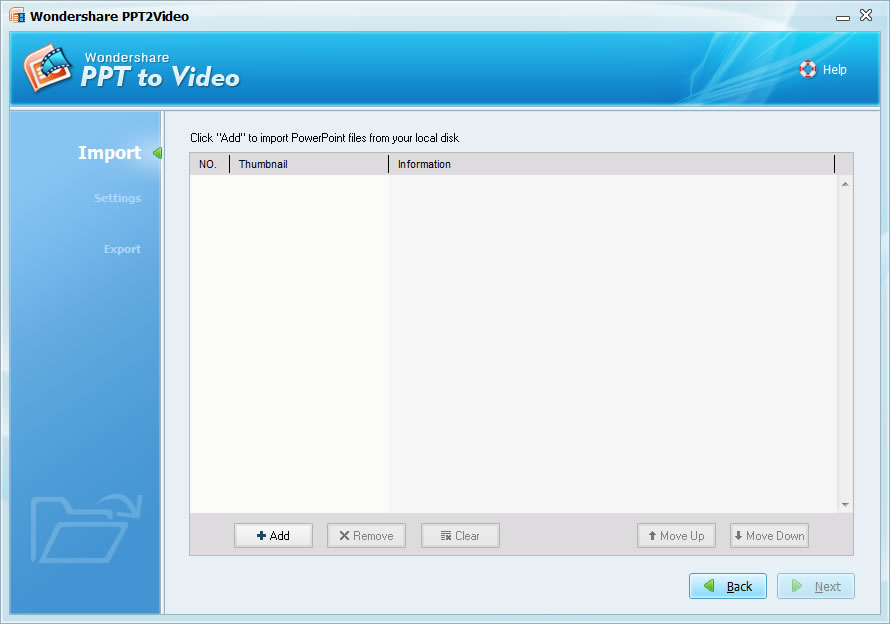
Step 2. Converting: Click " Next " until the converting starts
Step 3. Burn the converted video to DVD
Part 3. Use PPT2DVD to burn PowerPoint onto DVD directly � $99.95
Download: http://www.ppt-to-dvd.com/ppt2dvd/overview.html
Step 1: Import: You can import up to 9 presentation files at a time.
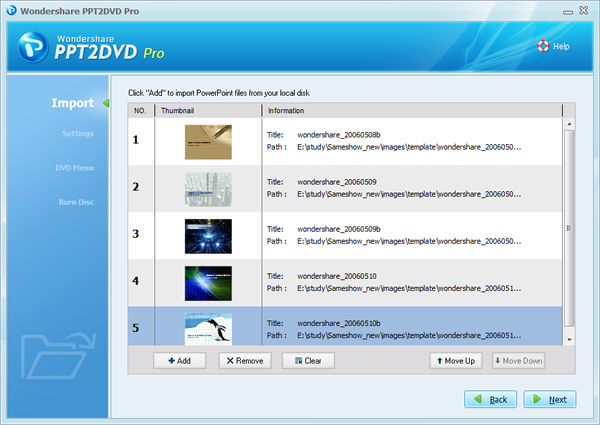
Step 2: Setting: Check the default settings and make some changes if needed

Step 3. Burn: Burn to DVD with a DVD Burner( either PPT2DVD built-in burner or Nero)
Part 4. Use Camtasia Studio to record PowerPoint as video to burn to DVD �$299.95
Download: http://www.techsmith.com
Step 1. Set your computer display resolution as 800*600
Step 2. Save your PPT file as PPS file
Step 3. Set Camtasia studio to record the whole screen

Step 4. Play your PowerPoint PPS file and Press "F9" to start recording the screen
Step 5. When you reach your last blank slide, Press F10 to tell Camtasia Recorder to stop recording. You will be prompted to save the captured slideshow, so choose a directory and enter a filename.
Click "Save". Camtasia will save your capture as an .AVI file.

Step 6. Then you can burn the video to DVD with Nero or Roxio
Part 5. Mac user � Use Quick time to convert PowerPoint to video to burn to DVD
Step 1. In Powerpoint, export your presentation as a Quicktime movie "PowerPoint Movie"

If you are using keynote, just export your presentation to Quicktime file directly


Step 2. Burn the Quicktime movie to DVD with your DVD burner.
- Advantages and disadvantages
- Method 1 is free but it will lost the transitions and animations in your original PowerPoint.
- Method 2 is cheap and it can retain transitions and animations, but it can't create DVD menus and retain the inner hyperlinks.
- Method 3 has a medium price, it can burn PowerPoint to DVD with DVD Menus and retain the animations, transitions, sound and movie clips in the original PowerPoint file. (Recommended)
- Method 4 is fairly expensive, but it has lots of other functions such as recording the screen.
- Method 5 is free, but only for Mac users.
Related Blog: http://ppt2dvd.blogspot.com http://blogs.digitalmediaonlineinc.com/powerpointtovideo/entry/20071211
Resource: http://www.ppt-to-dvd.com/blog/2007/12/11/5-methods-to-save-powerpoint-onto-dvd
Tuesday, November 20, 2007
MS PowerPoint and YouTube get married
MS PowerPoint and YouTube get married
Wondershare PPT to YouTube V1.0.0 released.
Nov. 16th, 2007 � Wondershare, the global award-winning provider of presentation authoring tools, today announced the release of PPT to YouTube 1.0.0,an innovative tool to put your PowerPoint slide show on YouTube.
Do you have some nice PowerPoint slide shows and want to share them with friends on YouTube?
Do you want to promote your products with PowerPoint presentations on YouTube?
But, you know YouTube only accept video formats such as WMV, MP4. To put PowerPoint slide show on YouTube, we shall convert the PowerPoint file to WMV or MP4 video format.
This is actually what can Wondershare PPT to YouTube do for you.
Benefits of putting PowerPoint slide show on YouTube
1. It is more convenient and easy to create compelling video slide show with PowerPoint and Wondershare PPT to YouTube
2. Broadcast yourself on YouTube with your unique PowerPoint photo slide show
3. Promote your product or company with PowerPoint presentation on YouTube worldwide
4. It is an innovative alternative solution to email a PowerPoint presentation to others.
Key Features of Wondershare PPT to YouTube
Convert PowerPoint presentations to WMV, MP4 video
Retain animations, transitions, sound and movie clips
Superior batch conversion: up to 8 PowerPoint files can be converted at a time
Click to learn more details about Wondershare PPT to YouTube.
http://www.ppt-to-dvd.com/powerpoint-to-youtube-overview.html
Pricing and Availability:
Price: $39.95
Free Trial:
http://www.ppt-to-dvd.com/download/powerpoint-to-youtube-download.html
System Requirements:
Microsoft Windows 2000/XP/2003/Vista
Microsoft PowerPoint 2000/2002/2003/2007
About Wondershare Software
Wondershare Software is an industry-leading desktop presentation application provider. Since its foundation, it has been specializing in providing powerful yet affordable multimedia presentation tools for home users, business people and educational professionals. Its product line includes flash presentation tools and video presentation tools. These tools offer users on-demand solutions with full controls to distribute presentations online and offline.
PowerPoint slides on YouTube
Link
http://www.youtube.com/watch?v=n8IZKcQwsYc
Wondershare PPT to YouTube V1.0.0 released.
Nov. 16th, 2007 � Wondershare, the global award-winning provider of presentation authoring tools, today announced the release of PPT to YouTube 1.0.0,an innovative tool to put your PowerPoint slide show on YouTube.
Do you have some nice PowerPoint slide shows and want to share them with friends on YouTube?
Do you want to promote your products with PowerPoint presentations on YouTube?
But, you know YouTube only accept video formats such as WMV, MP4. To put PowerPoint slide show on YouTube, we shall convert the PowerPoint file to WMV or MP4 video format.
This is actually what can Wondershare PPT to YouTube do for you.
Benefits of putting PowerPoint slide show on YouTube
1. It is more convenient and easy to create compelling video slide show with PowerPoint and Wondershare PPT to YouTube
2. Broadcast yourself on YouTube with your unique PowerPoint photo slide show
3. Promote your product or company with PowerPoint presentation on YouTube worldwide
4. It is an innovative alternative solution to email a PowerPoint presentation to others.
Key Features of Wondershare PPT to YouTube
Convert PowerPoint presentations to WMV, MP4 video
Retain animations, transitions, sound and movie clips
Superior batch conversion: up to 8 PowerPoint files can be converted at a time
Click to learn more details about Wondershare PPT to YouTube.
http://www.ppt-to-dvd.com/powerpoint-to-youtube-overview.html
Pricing and Availability:
Price: $39.95
Free Trial:
http://www.ppt-to-dvd.com/download/powerpoint-to-youtube-download.html
System Requirements:
Microsoft Windows 2000/XP/2003/Vista
Microsoft PowerPoint 2000/2002/2003/2007
About Wondershare Software
Wondershare Software is an industry-leading desktop presentation application provider. Since its foundation, it has been specializing in providing powerful yet affordable multimedia presentation tools for home users, business people and educational professionals. Its product line includes flash presentation tools and video presentation tools. These tools offer users on-demand solutions with full controls to distribute presentations online and offline.
PowerPoint slides on YouTube
Link
http://www.youtube.com/watch?v=n8IZKcQwsYc
Monday, November 19, 2007
Wondershare PPT to YouTube V1.0.0 released-Put PowerPoint on YouTube
Wondershare PPT to YouTube V1.0.0 released-Put PowerPoint on YouTube
Nov. 16th, 2007 � Wondershare, the global award-winning provider of presentation authoring tools, today announced the release of PPT to YouTube 1.0.0,an innovative tool to put your PowerPoint slide show on YouTube.
Do you have some nice PowerPoint slide shows and want to share them with friends on YouTube?
Do you want to promote your products with PowerPoint presentations on YouTube?
But, you know YouTube only accept video formats such as WMV, MP4. To put PowerPoint slide show on YouTube, we shall convert the PowerPoint file to WMV or MP4 video format.
This is actually what can Wondershare PPT to YouTube do for you.
Benefits of putting PowerPoint slide show on YouTube
1. It is more convenient and easy to create compelling video slide show with PowerPoint and Wondershare PPT to YouTube
2. Broadcast yourself on YouTube with your unique PowerPoint photo slide show
3. Promote your product or company with PowerPoint presentation on YouTube worldwide
4. It is an innovative alternative solution to email a PowerPoint presentation to others.
Key Features of Wondershare PPT to YouTube
Convert PowerPoint presentations to WMV, MP4 video
Retain animations, transitions, sound and movie clips
Superior batch conversion: up to 8 PowerPoint files can be converted at a time
Click to learn more details about Wondershare PPT to YouTube.
http://www.ppt-to-dvd.com/powerpoint-to-youtube-overview.html
Pricing and Availability:
Price: $39.95
Free Trial:
http://www.ppt-to-dvd.com/download/powerpoint-to-youtube-download.html
System Requirements:
Microsoft Windows 2000/XP/2003/Vista
Microsoft PowerPoint 2000/2002/2003/2007
About Wondershare Software
Wondershare Software is an industry-leading desktop presentation application provider. Since its foundation, it has been specializing in providing powerful yet affordable multimedia presentation tools for home users, business people and educational professionals. Its product line includes flash presentation tools and video presentation tools. These tools offer users on-demand solutions with full controls to distribute presentations online and offline.
Do you have some nice PowerPoint slide shows and want to share them with friends on YouTube?
Do you want to promote your products with PowerPoint presentations on YouTube?
But, you know YouTube only accept video formats such as WMV, MP4. To put PowerPoint slide show on YouTube, we shall convert the PowerPoint file to WMV or MP4 video format.
This is actually what can Wondershare PPT to YouTube do for you.
Benefits of putting PowerPoint slide show on YouTube
1. It is more convenient and easy to create compelling video slide show with PowerPoint and Wondershare PPT to YouTube
2. Broadcast yourself on YouTube with your unique PowerPoint photo slide show
3. Promote your product or company with PowerPoint presentation on YouTube worldwide
4. It is an innovative alternative solution to email a PowerPoint presentation to others.
Key Features of Wondershare PPT to YouTube
Convert PowerPoint presentations to WMV, MP4 video
Retain animations, transitions, sound and movie clips
Superior batch conversion: up to 8 PowerPoint files can be converted at a time
Click to learn more details about Wondershare PPT to YouTube.
http://www.ppt-to-dvd.com/powerpoint-to-youtube-overview.html
Pricing and Availability:
Price: $39.95
Free Trial:
http://www.ppt-to-dvd.com/download/powerpoint-to-youtube-download.html
System Requirements:
Microsoft Windows 2000/XP/2003/Vista
Microsoft PowerPoint 2000/2002/2003/2007
About Wondershare Software
Wondershare Software is an industry-leading desktop presentation application provider. Since its foundation, it has been specializing in providing powerful yet affordable multimedia presentation tools for home users, business people and educational professionals. Its product line includes flash presentation tools and video presentation tools. These tools offer users on-demand solutions with full controls to distribute presentations online and offline.
Thursday, November 8, 2007
Make a merchandise presentation for Christmas promotion
Make a merchandise presentation for Christmas promotion
As Christmas approach, suppliers and retailers are all busy making plans for the golden season. We all love it for its promotions and shopping opportunities.
To show your merchandise lively to customers, you may plan to make a merchandise presentation and show to customers on a big digital screen.
Do you know how to make this kind of presentation and how to put it on a digital screen?
You can buy services and equipments with thousands of dollars from companys that provide this kind of solutions. But that's NOT what I recommend. There is a DIY solution which only cost about $100.
Now, let's begin!
Step1: Preparation
Software: Microsoft PowerPoint, Wondershare PPT2DVD
Hardware: TV set, DVD Player
Step 2: Make the presentation
Make the product presentation with PowerPoint. You can add transitions, animations, sound and movie clips.
Step 3: Burn to DVD
Import: You can import up to 9 presentation files at a time.
Setting: At the "Play options" tab, make sure "Play the slides automatically" and "Loop Play" were checked.
Burn: Burn to DVD with a DVD Burner( either PPT2DVD built-in burner or Nero)
To learn more how to use PPT2DVD, please check here:
http://www.ppt-to-dvd.com/forum/topic2351.html
Step4: Connect the DVD Player to TV set
Make sure your DVD Player and the TV set are connected.
Insert the DVD to DVD Player, and the merchandise presentation can loop play continuously.
More advantages:
1. By putting the merchandise presentation on DVD, you can package it to the merchandise as a free gift.
2. You can also show your merchandise presentation anywhere with a portable DVD Player.
Enjoy and share PowerPoint slides through your video iPod
Enjoy and share PowerPoint slides through your video iPod
As Christmas Day is nearby, except planning for the Christmas decorations, we are also preparing gifts such as some beautiful photo slide show, E-cards, presentations for a happy Christmas celebration.
Making the gifts by yourself is a wonderful thing which can show your greetings to your friends or family. And how can we do it? What tool should we use?
PowerPoint is the first choice regarding this kind of jobs. It is powerful , and what is more important, it is very easy to use. We can create beautiful slides just by several steps. It is recommended that you use PowerPoint 2007, which is more easier to handle with clear navigations for all the actions and elements.
Here is some Christmas slideshow samples made by PowerPoint from http://www.tommyswindow.com/slideshows_christmas.htm
These beautiful slides are all made by PowerPoint. You can make this kind of slides by yourself.
And after you creat a compelling PowerPoint slide show, then come another question, how to share these beautiful slides with your friends and family? They may not have PowerPoint or even a computer to view your PowerPoint slide show. But I can bet they would probably have an iPod.
How to play the PowerPoint slides on iPod?
We know that we can play Video such as MP4 movie on iPod. So the question is how to convert your PowerPoint slides to MP4 video.
Here I recommand a tool, Wondershare PPT to iPod, which can help us convert PowerPoint slides to mp4 video and play the video on video iPod.
It will be amazing if you send the video to your friends or family through your iPod or iTunes. Just think about it, haha, is it a wonderful idea?
To learn more about how to use Wondershare PPT to iPod, please follow the URL below.
http://www.ppt-to-dvd.com/powerpoint-to-ipod.html
Directly download: http://www.ppt-to-dvd.com/download/powerpoint-to-ipod.html
Monday, November 5, 2007
Free Thanksgiving Day PowerPoint template download
Free Thanksgiving Day PowerPoint template download
Download it at the link below
Preview it on YouTube
This video is converted from a PowerPoint presentation.
If you want to create video from PowerPoint slideshow like this.
You can use the tool Wondershare PPT to Video from http://www.ppt-to-dvd.com/
If you want to create video from PowerPoint slideshow like this.
You can use the tool Wondershare PPT to Video from http://www.ppt-to-dvd.com/
Subscribe to:
Posts (Atom)


